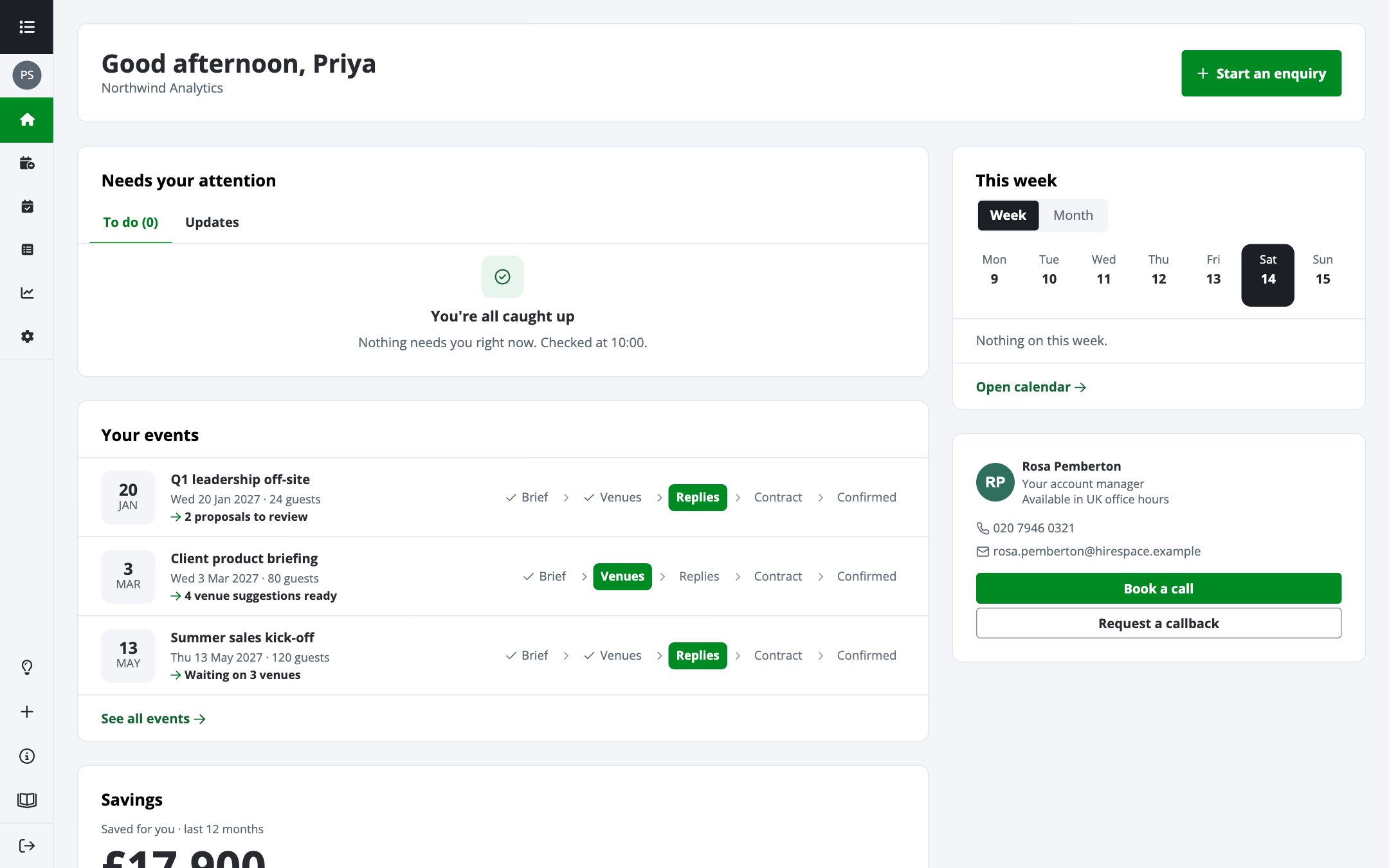
Guided tour
Find your way around Hire Space
A quick look around: your Home page, the sidebar, your events and where to find settings and help. Click the highlighted parts of the screen to move on, or use the arrow keys.
Hire Space 360 is the service level your company signs up to with Hire Space, under a signed agreement. It gives you an account manager on your events, and your contracts and invoices go through Hire Space. It also switches on extra features in the Hire Space client platform at home.hirespace.com, where you run your events. This page covers what the agreement includes and what it adds to the client platform. For everything else in the client platform, see find your way around.
Who can use it
- Hire Space 360 clients (your company has signed an agreement with us): everything on this page.
- Preferred clients: the full event workspace, Deep Venue Research and the account manager panel at your agreed rate. The event policy and approvals settings are there, but you need to Talk to sales to switch them on.
- Signed in with no company agreement: you run your own enquiries with Brief, Venues, Send brief and Messages. Features for the two groups above say Preferred or Hire Space 360 Clients only.
- Managed enquiries: when Hire Space runs an event for you, your account manager does the searching and contacting, and you review the proposal they build.
If you’re not sure which applies to you, ask your account manager. Their card is on your Home page.
Why choose Hire Space 360
- Someone can run an event for you. Hand an event to your account manager and they contact the venues, arrange site visits and handle the negotiation. On events above your budget threshold, that’s included at no fee.
- One supplier to pay. Hire Space 360 clients always contract through Hire Space, so the invoices come from us and your finance team pays one supplier rather than every venue.
- Your rules are checked before venues are contacted. Upload your event policy and we check every brief against it. Budget approval rules hold an event until the right person has signed it off.
- You see the whole company’s spend. Reports shows activity, spend and what we saved you across your events, and you can ask it questions in your own words.
Before you start
You need an account. See Create an account or join your company’s, or Log in if you have one.
What the service includes
An account manager on your events
Every event has the account manager panel. Your account manager can run an event for you: they build the shortlist with real pricing and confirmed availability, run the site visits and handle the negotiation. Their quotes arrive on the event’s Proposal tab with the venue they recommend and why. You see everything they do, and you can take the event back until work has started.
The account manager who looks after your company’s account is on your Home page, with Book a call and Request a callback.
Contracts and invoices through Hire Space
Hire Space 360 clients always contract through Hire Space. You request, sign and pay on the event’s Contracts and Payments stages on every booking. Invoices come from Hire Space, not the venue: you pay us and we pay the venue. Each payment your contract sets out gets its own invoice and due date. For a statement of your account, ask your account manager.
What it costs
Running an event yourself is free. Fees for contracting, payment and account management are set in your company’s agreement.
An account manager is included at no fee when your event’s budget, before VAT, clears a threshold. The threshold depends on the country the event is in, and your company’s agreement may set its own. On a smaller event, an account manager is charged at an hourly rate set in your agreement. The panel on each event shows whether it’s included, and your account manager can talk you through your fees.
What Hire Space 360 adds to the client platform
Everyone who signs in gets the same Home page and sidebar. If your company is on Hire Space 360, these features are switched on as well. Preferred clients get most of them.
| Feature | Hire Space 360 clients | Preferred clients |
|---|---|---|
| Event policy and Approvals in Settings: every brief checked against your policy, and budgets signed off before venues are contacted | Yes, set by your admins | Shown, with Talk to sales to switch them on |
| Reports | Ask, Overview and Savings, with exports | Overview and Savings |
| Proposal, Contracts, Payments and Savings on your events | Yes | Yes |
| Contracting through Hire Space | Always | When Hire Space runs your enquiry, or on enquiries you run yourself if your company chooses it in Settings > Contracting |
| Users, teams and company settings | Yes | Yes |
| Venue shortlists for your company | Yes | Yes |
| Deep Venue Research on every event | Yes | Yes |
| The account manager panel on every event | Yes, included at no fee above your budget threshold | Yes, at your agreed rate |
If your company is on Hire Space 360, approvers also see budget requests waiting for them under To do on their Home page, and a team can pin up to six saved reports to its Home page.
What happens next
Take the tour above to see Home, the sidebar and an event’s stages. Then start your first event.
Good to know
- On hirespace.com, open My Hire Space in the header and choose Hire Space 360 to get to the client platform.
- How it works at the top of home.hirespace.com explains the two ways to work with us before you sign up.
Troubleshooting
- A feature says Preferred or Hire Space 360 Clients only: your company doesn’t have that arrangement yet. Ask your account manager, or talk to our Concierge team.
- Settings and Reports are in everyone’s sidebar. If Reports says Unlock Reports, ask an admin at your company to check you have the User or Admin role.
Still need help?
Contact your account manager, or email our team.