Guided tour
Find hotels for your group
Find business hotels that can take your group, see what a room typically costs in your month, then ask a hotel for a room block and get an instant quote. Click the highlighted parts of the screen to move on, or use the arrow keys.
Find business hotels that can take your whole group, see what a room typically costs in the month you need it and ask a hotel for a room block. You get an instant quote for your rooms and nights straight away, instead of ringing hotels one by one.
Who can use it
- No account yet: search, open hotel pages and ask for a quick quote. We create your enquiry when you send it.
- Signed in with no company agreement, preferred clients and Hire Space 360 clients: the same, and your rooms join your enquiries in the Hire Space client platform.
- Managed enquiries: if Hire Space runs your event, your account manager can find and add hotels for you. See Hotels in your proposal.
Why search hotels for your group
- Only hotels that can take your group. Filter by rooms per night, room type, star rating and facilities such as meeting space on site or coach parking, so you don’t ring hotels that are too small.
- Know the going rate for your month. Each hotel shows its typical price per night for the month you need, worked out from its live rates and from room-block quotes hotels have given us before.
- Rooms and event space on one enquiry. Ask for event space near the hotel on the same request, and if you’ve already enquired about a venue for the same event, your rooms join that enquiry.
Before you start
Know roughly how many rooms you need a night, for how many nights, and the area. You don’t need a venue yet. If you have one, see Add hotel rooms to your enquiry.
Search for hotels
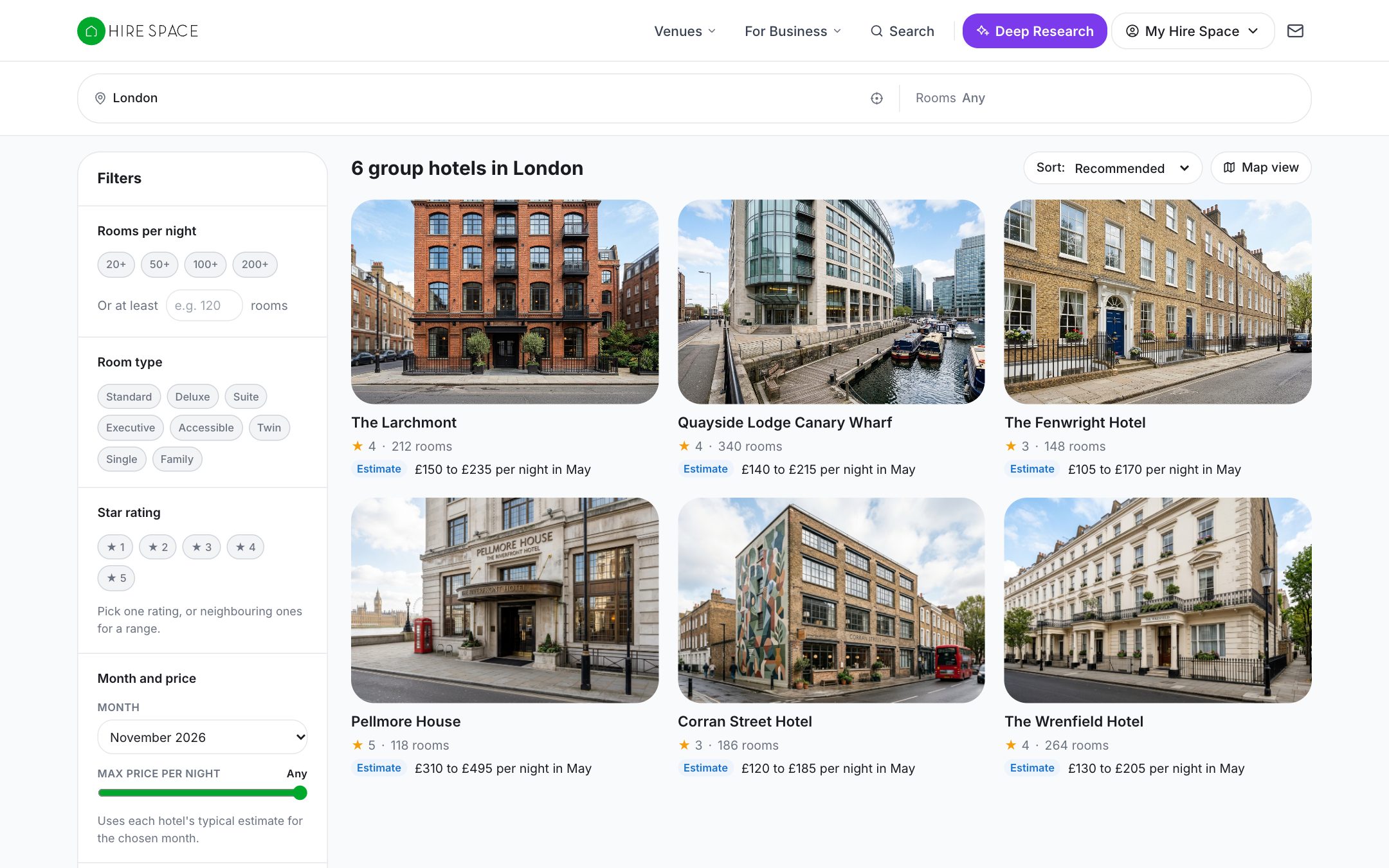
- Go to hirespace.com/Group-Accommodation. It opens on group hotels in London.
- Type the area you need in the search bar and pick it from the list. Enter the fewest rooms you need a night in Rooms.
- Narrow the list with Filters:
- Rooms per night: 20+, 50+, 100+ or 200+, or a number in Or at least.
- Room type, such as Standard, Twin or Accessible.
- Star rating: one rating, or neighbouring ones for a range.
- Month and price: the month of your stay, and a top Max price per night. This uses each hotel’s typical price for that month.
- Facilities: Meeting space on site, Coach parking and Breakfast included.
- Change the order with Sort: Recommended, Price: low to high, Most rooms, Star rating or Distance.
- Click Map view to see the hotels on a map, and Search this area to search where you’ve moved it. List view takes you back.
Every hotel shows its stars, its number of rooms and its typical price per night in your month, marked Estimate.
Read a hotel page
Click a hotel to open its page. It shows:
- photos, the star rating and the address, with Show map
- the number of rooms, the meeting space and a nightly price range, with a month selector to check another month
- Rooms and typical prices: each room type with its range per night. Click a room type to see how many there are, how many guests each takes and a chart of its price through the year
- Facilities, Meeting space and the venues near the hotel
Every price on a hotel page is a guide from typical rates for that month, not a quote. A price marked Estimate is for a month we haven’t yet seen the hotel’s own rates for. The hotel confirms prices when you enquire.
Ask for a room block
- Click Get a quick quote.
- Under Your rooms, set the Check-in date, Nights, Rooms per night and Room type.
- If some nights need more rooms, or you want a mix of room types, open Advanced. Set Peak-night rooms and add types under Room-type mix (optional).
- If you need somewhere to hold the event too, tick Also need event space? and choose how close it should be. We’ll ask about your event next and suggest event spaces nearby on the same enquiry.
- Click Next: Anything else?, add anything the hotel should know, then fill in Your details.
- Click Get Instant Quote.
After a moment you see Your Instant Quote. Click See your quote and add venues to go on to your enquiry, where you can add more hotels or venues. If the quote takes longer, we take you there anyway and it appears when it’s ready.
If you’ve already enquired about a venue for the same event, your rooms join that enquiry instead of starting a new one.
How room-block quotes work
A room-block quote is a range for your rooms and nights, for example “£9,900 to £11,940 for 60 rooms × 1 night”. Under it you’ll see:
- the price per room per night, also as a range
- whether VAT is included: Includes VAT, Excludes VAT or not yet known
- the month the figure is based on, if we had no price for your month and used the nearest one
- Estimate, confirmed on enquiry
We work the figure out from each hotel’s live rates, checked at several check-in dates every month, and from room-block quotes hotels have given us before. Most business hotels on Hire Space have 12 months of nightly rates built this way.
A quote isn’t the final price and isn’t a hold on any rooms. The hotel confirms its rate and availability when it replies to your enquiry.
What happens next
Your enquiry goes to the hotel. You can add more hotels, or venues for the event itself, at checkout. See Add hotel rooms to your enquiry.
Good to know
- Venues with their own bedrooms show an Accommodation at section on their venue and space pages, with the room types and nightly ranges. See accommodation opens the hotel’s own page.
- Hire Space also has hotel pages for common searches, such as hotels with 100 or more rooms in London, four-star hotels or group hotels near a venue. Each lists the hotels that fit, with their typical prices.
- Prices are in pounds and the quote says whether VAT is included.
Troubleshooting
- Nothing matches my search: the page suggests ways to widen it, such as Widen the area, Fewer rooms or Raise the max price. Clear all resets every filter.
- A hotel says “Add your event dates for a room price.”: a room-block quote needs dates. Add them with Revise brief at the top of your enquiry.
- I need help choosing: talk to our Concierge team.
Still need help?
Contact your account manager, or email our team.