Guided tour
Compare your instant quotes
A short guided tour of the screen you see after you send an enquiry on hirespace.com. Click the highlighted parts of the screen to move on, or use the arrow keys.
Read the video transcript
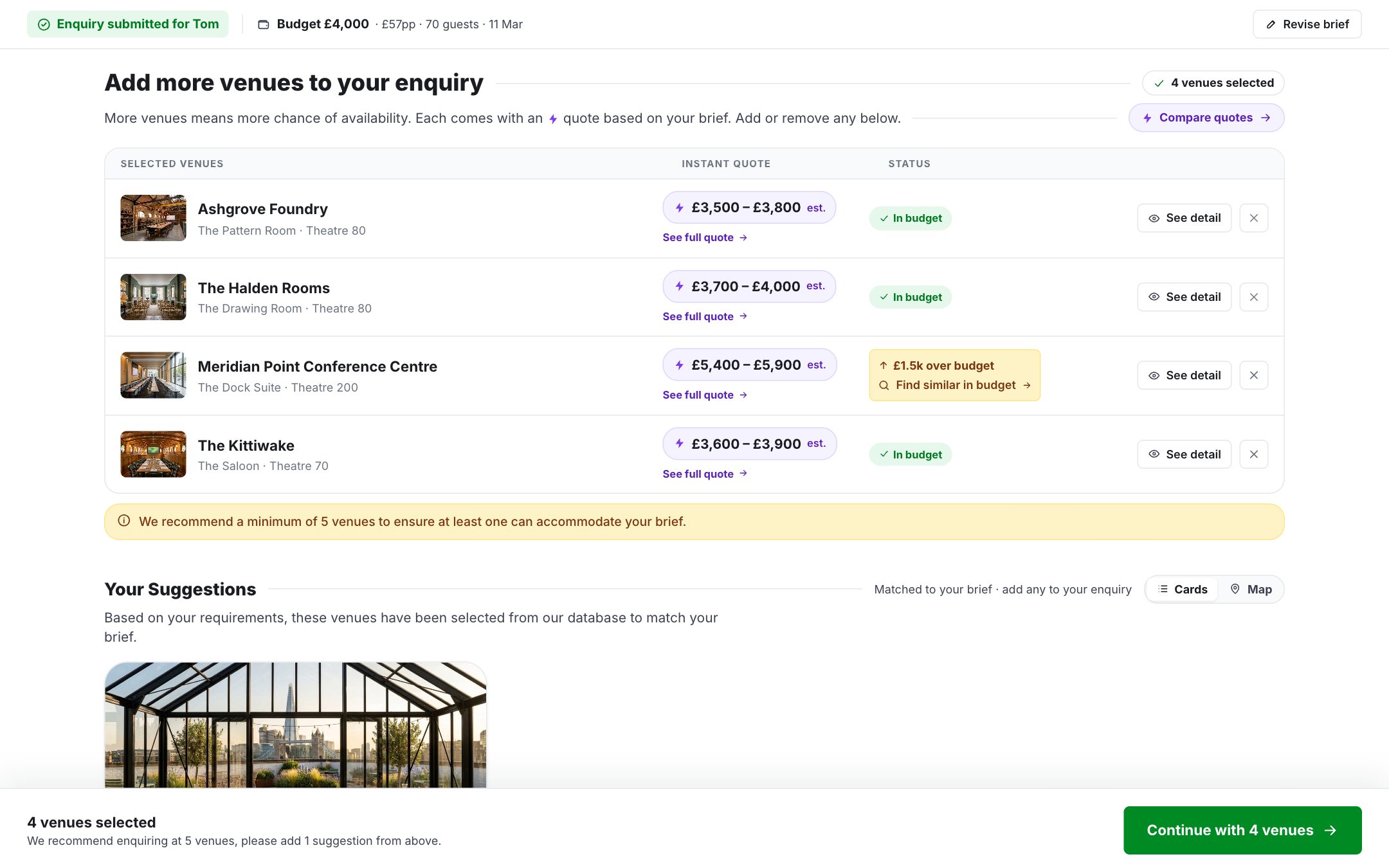
On hirespace.com, you can send your brief to several venues at once, with no account needed, and see an instant quote for each one straight away. Start on a venue's page on hirespace.com. Click Get Instant Quote, add your brief and your details, then click Send brief to venue. You land on Your instant quotes. Each venue on your list shows an estimated price range for your event, and whether it's within your budget. Click See full quote to see how the estimate is made up, from venue hire to catering and equipment. These are estimates based on real quotes for similar events, not final prices. To see all your venues side by side, click Compare quotes. If a venue is over budget, use Find similar in budget to see alternatives that fit. Scroll down to Your Suggestions for more venues matched to your brief, and click Add to enquiry to include one. When your list is ready, click Continue. Depending on your event, we'll check availability with the venues for you, or you can carry on in the Hire Space client platform.
When you send an enquiry on hirespace.com, you get an instant quote for every venue on your list. Use this screen to compare them, add more venues and choose which ones to go ahead with.
Who can use it
- Anyone on hirespace.com: you don’t need an account. You see this screen right after you send an enquiry.
- Signed in to Hire Space: you get instant quotes on your event’s Venues stage instead. See Get instant quotes.
Why compare quotes side by side
- See which venues fit your budget straight away. Every venue on your list shows an estimated price range and whether it’s in budget, before any venue has replied.
- Swap out venues that cost too much. For a venue over budget, Find similar in budget shows alternatives that fit.
- Widen your list before you commit. We suggest more venues matched to your brief, and if you chose fewer than 3, we add 3 for you to keep or remove.
- See what makes up each price. See full quote breaks an estimate into items such as venue hire, AV and service charge, so you can tell why one venue costs more than another.
Before you start
Start an enquiry on hirespace.com: from a space page, or by choosing venues and clicking to enquire.
Check each venue’s quote
Right after you send your enquiry, each venue on your list shows an estimated price, so you can see straight away which venues fit your budget.
- Send your enquiry. You land on Your instant quotes, under Add more venues to your enquiry.
- Check each venue’s quote. It shows an estimated price range and whether the venue is In budget or how far over budget it is.
- Click See full quote under a venue to see how the estimate is made up, for example venue hire, day delegate rate, AV and equipment and service charge, with an Indicative total exc. VAT.
Compare venues and find alternatives in budget
Put your venues side by side to choose between them, and swap in alternatives for any that cost too much.
- Click Compare quotes to see all your venues side by side.
- For a venue that is over budget, click Find similar in budget to see alternatives that fit.
Add or remove venues
We suggest more venues matched to your brief, so you can widen your list before you continue. If you chose fewer than 3 venues, we add 3 suggested venues for you to keep or remove.
- Scroll down to Your Suggestions for more venues matched to your brief.
- Click Add to enquiry to include one.
- To take a venue off your list, click the cross next to it.
Continue with your chosen venues
When your list is ready, continue to the next step of your enquiry.
- Click Continue with followed by the number of venues.
What happens next
After you continue, we either check availability with the venues for you or take you to your messages in Hire Space, depending on your event. See Message venues about your event.
Good to know
- Instant quotes are estimates based on real quotes for similar events, not final prices. Each venue confirms its own price.
- Prices exclude VAT.
- To change your event details, click Revise brief at the top of the page.
- Availability checks are for business events of 100 or more guests booked with a work email address.
Troubleshooting
A venue I wanted is not on the list.
Look under Your Suggestions, or search hirespace.com for it and add it to your enquiry.
Every venue is over budget.
Use Find similar in budget on each venue, or click Revise brief to change your budget or guest numbers.
Still need help?
Contact your account manager, or email our team.