Guided tour
Get instant quotes
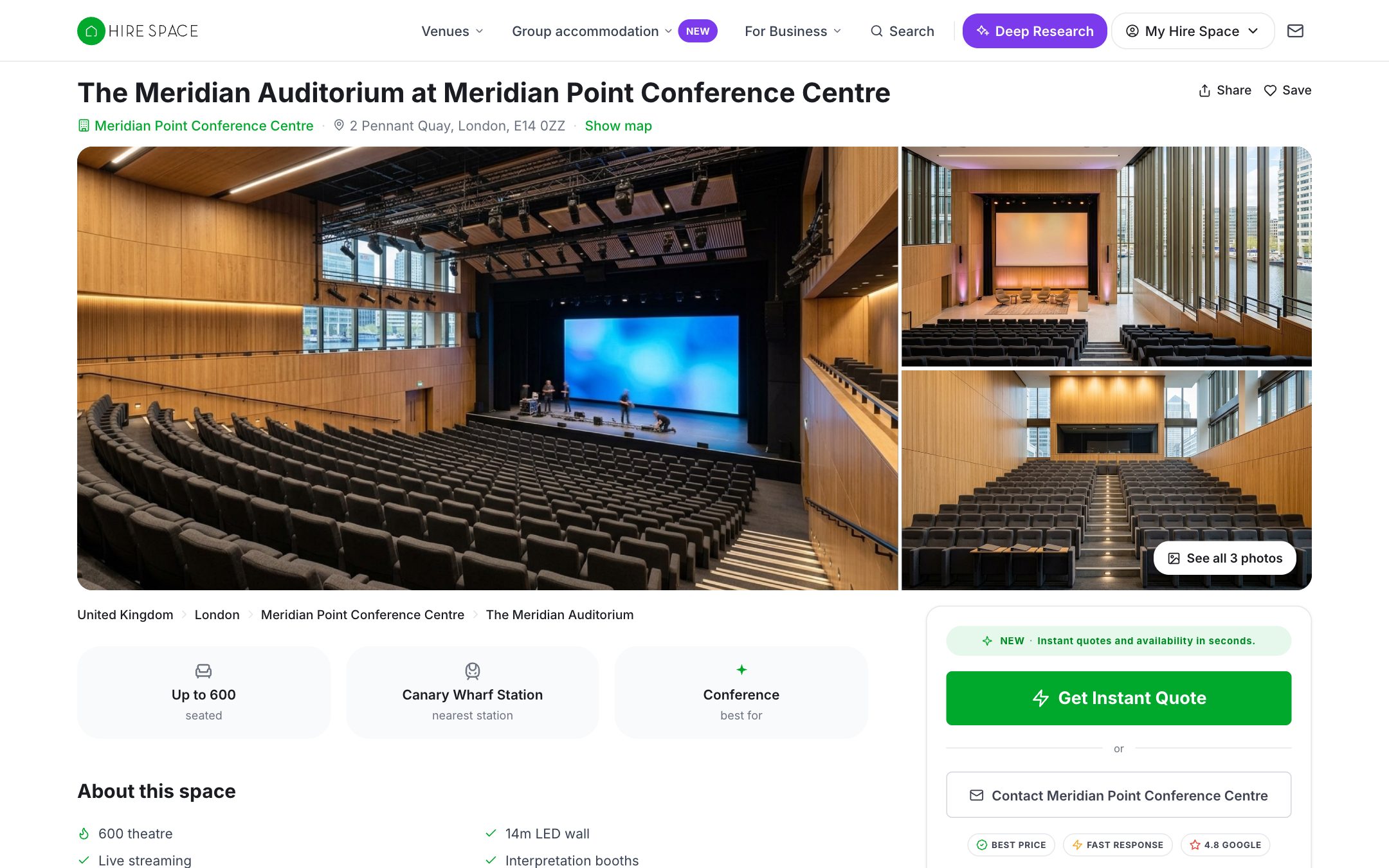
Venues on Hire Space come with an instant quote: a price estimate built from real quotes for similar events. It gives you a realistic idea of cost before the venue has replied. Click the highlighted parts of the screen to move on, or use the arrow keys.
Earlier in this series: Start an enquiry, then Find and add venues
Read the video transcript
Venues on Hire Space come with an instant quote: a price estimate built from real quotes for similar events. It gives you a realistic idea of cost before the venue has replied. Here's where to find them, and how to get the most from them. While you're browsing hirespace.com, every venue and space page has Get Instant Quote. Click it, add your brief and your details, and your quote appears straight away. Your brief only goes to the venue when you click Send brief to venue. The Hire Space client platform, at home.hirespace.com, takes this further. Your event keeps one brief, so every venue you look at is priced against the same dates, guests and budget. On your Home page, under Your events, open your event. Then click Venues along the top. Each venue under Your venues shows its instant quote, and its Status tells you whether it fits your budget. Click See estimate under a quote. You see the range before VAT, the tax and the total, what the estimate is based on, and what's typically included at that venue. Recent quotes for that venue make the most reliable estimate. A Market estimate hasn't been checked with the venue, so treat it as a rough guide. If a venue is over budget, click Find similar in budget. Pick an alternative and click Add to enquiry. It joins your venues with its own instant quote. To find more, use Suggested venues: quick picks matched to your brief, each with an instant quote and whether it's in budget. Click View breakdown to check one, or Add to enquiry to keep it. You can also search on a map or as a list, or use Deep venue research, and add any venue you find the same way. When your list is ready, click Send brief to send it to your venues. When a venue sends its own quote, it replaces the estimate and the link reads See full quote, ready to compare on your proposal. An instant quote is an estimate, not a final price. The full steps are in the help article.
An instant quote is a price estimate for a venue, built from real quotes for similar events. It gives you a realistic idea of cost straight away, before the venue has replied.
Who can use it
- On hirespace.com, with or without an account: get an instant quote on a space page, as part of sending an enquiry.
- Everyone signed in to Hire Space, in the Hire Space client platform at home.hirespace.com: every venue you add to an event comes with an instant quote, and so do suggested venues.
Why use instant quotes
- Check the price before you contact anyone. You see what a venue is likely to cost for your event straight away, so you only send your brief to venues you can afford.
- Your budget is checked for you. Each estimate is marked In budget, Potentially in budget or how far over budget it is, and a venue that’s over offers Find similar in budget.
- You know how far to trust it. Each quote says what it’s based on, from recent quotes for that venue to a market estimate.
- It leads to the real quote. When a venue sends its own quote, it replaces the estimate, ready to compare on your proposal.
Instant quotes on hirespace.com
- On a space page, you get an instant quote by filling in your event and contact details. Your brief goes to the venue when you click Send brief to venue. The quote shows as Your Instant Quote, with an Estimated total excluding VAT.
- After you send an enquiry, Your instant quotes shows an estimate for each venue you chose, and you can add more matched venues and compare your instant quotes with Compare quotes. That guide has a video.
What the client platform adds
- One brief for the whole event. Every venue you look at is priced against the same dates, guests and budget.
- Find similar in budget. When a venue is over budget, see alternatives that fit and click Add to enquiry to add one. It joins Your venues with its own instant quote.
- Suggested venues. Quick picks matched to your brief, each with an instant quote and whether it’s in budget. Click View breakdown to check one, or Add to enquiry to keep it.
- Send brief. When your list is ready, click Send brief to send it to your venues. When a venue sends its own quote, it replaces the estimate and the link reads See full quote, ready to compare on your proposal.
Instant quotes on your event
- Sign in at home.hirespace.com and open your event from Your events on your Home page.
- Click Venues along the top. Each venue under Your venues has an instant quote under Quote / Estimate, and whether it fits your budget under Status.
- Click See estimate under a quote to see how it’s worked out: the range before VAT, the VAT, the total including VAT, what it’s based on and what’s typically included at that venue.
Suggested venues and Deep Venue Research results show an instant quote too. Click View breakdown on any of them.
Once a venue sends its own quote, it replaces the estimate and the link reads See full quote. Compare the real figures on your proposal. See Review and compare proposals.
How far to rely on an instant quote
- It’s an estimate, not a confirmed quote. The final price depends on your exact requirements and availability.
- Estimates are shown before VAT.
- Each quote says what it’s based on: recent quotes for that venue, the venue’s pricing history or published rates, or a Market estimate. A market estimate hasn’t been checked with that venue, so treat its line items as a rough guide.
- We compare each estimate with your budget: In budget, Potentially in budget, or how far over budget it is, with a Find similar in budget button.
What happens next
Send your brief to your venues for their own quotes. See Send your brief to venues.
Troubleshooting
A venue shows “Quote unavailable”.
We don’t have enough data to estimate that venue. Send it your brief to get a real quote.
A venue shows “No quote”.
The venue can’t host your event as briefed. Look at the alternatives shown with it.
A venue shows “Quote being checked”.
The estimate is still being prepared. Check back shortly.
“We couldn’t generate an instant quote. Please try again later.”
Try again later, or send the venue your brief for a real quote.
Still need help?
Contact your account manager, or email our team.